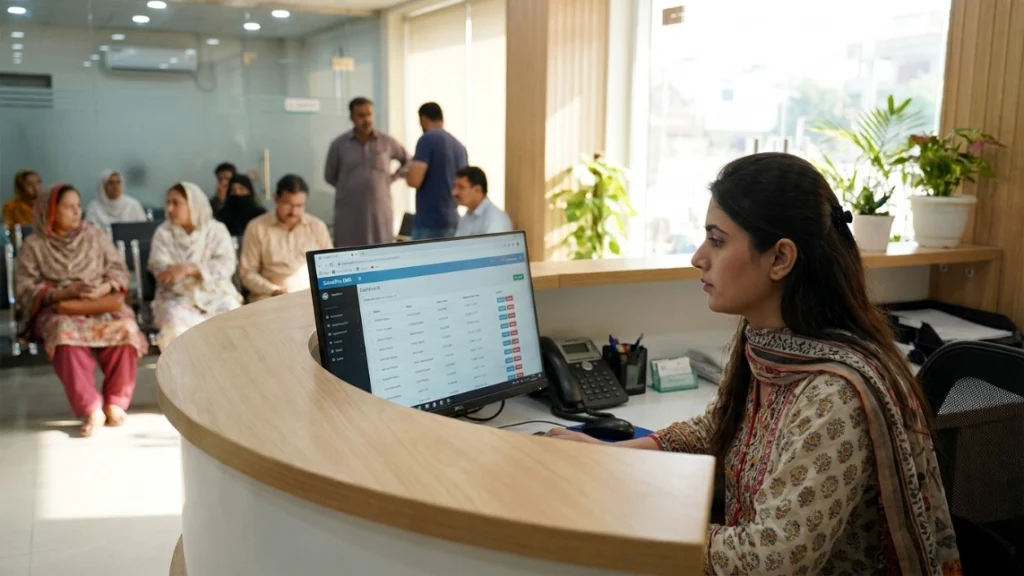
Your clinic sees 60 patients a day. Three of them walk in without appointments. Two more don’t show up. Your receptionist is juggling a paper register, a WhatsApp group, and her memory — and somewhere in that chaos, a patient’s follow-up note got lost in a file cabinet from 2021.
This is not a technology problem. It’s a systems problem. And choosing the wrong clinic management software — or the right one badly implemented — makes it worse, not better.
According to a 2023 report by the Pakistan Health Information Exchange, fewer than 18% of private clinics in Pakistan have adopted any form of digital patient management. That gap is closing fast, and the clinics that get this right now will be managing double the patients in the same time in two years.
This guide walks you through exactly how to choose clinic management software that works for your specific practice — whether you’re a general physician in Multan running 40 consultations a day, a gynecologist in Lahore managing ante-natal follow-ups, or a cardiologist in Karachi building a multi-branch practice. We’ll cover what to look for, what to avoid, and what questions to ask before you commit.
1. What Does Your Clinic Actually Need? Start Here Before Comparing Software
Most clinic owners start by searching for the “best” software. That’s the wrong starting point. The right question is: where does your clinic lose the most time, money, or patient trust right now?
Start by identifying your single biggest breakdown — then work outward to find software that solves it specifically.
A general physician in Sahiwal seeing 70 walk-ins a day has a completely different problem than a dermatologist in Sialkot running a referral-heavy practice with follow-up skin treatment protocols. One needs fast token queuing and prescription printing. The other needs detailed patient history, treatment progress tracking, and reminder automation.
Ask yourself three questions before you open a single software demo:
Where do patients get frustrated? Is it waiting time? Appointment confusion? Not receiving reminders?
Where does your staff struggle most? Is it managing paper files? Taking down prescription notes? Handling billing manually?
Where do you lose revenue? No-shows without reminders? Missed follow-ups? Double bookings that upset patients and waste slots?
Once you can answer these clearly, you’re shopping for a solution — not just a product. Pediatricians in Islamabad often find that automated SMS reminders cut no-shows by nearly 30% within the first month, because parents forget vaccine appointments and need that nudge. That single feature pays for the software cost several times over.
Write your top three pain points down before your first demo call. Every software salesperson will tell you their tool solves everything. You need to hold them to your actual problems.
2. What Features Should Clinic Management Software Include?
The core feature list for any clinic management software isn’t long — but every item on it has to work well under real clinic conditions, not just in a product demo.
A complete clinic management system should handle appointment scheduling, patient records, prescriptions, reminders, billing basics, and reporting — as a minimum floor, not a premium add-on.
Here’s the breakdown of what matters and why, in order of daily impact:
Appointment Scheduling and Token Queue Management
This is the first thing your receptionist touches every morning. If it’s slow, confusing, or crashes when 10 patients check in at once, you’ve already lost the day.
For Pakistani clinics with strong walk-in culture, a live token queue system matters as much as appointment slots. Patients who walk in without booking still need a structured queue — and they need to see where they stand. SehatPro’s appointment scheduling and queue management system handles both booked and walk-in patients in the same view, so your receptionist never has to manage two separate lists.
Electronic Medical Records (EMR)
Look for software that stores a patient’s complete lifetime history — not just the last visit. A pulmonologist in Faisalabad reviewing a patient they saw eight months ago needs to pull up that spirometry reading in under 10 seconds. If the software forces you to scroll through poorly organised entries or switch screens three times, it’s not built for clinical workflows.
SehatPro’s unlimited patient records system keeps full visit history, diagnoses, prescriptions, and lab results under a single patient profile — searchable by name, phone number, or CNIC.
Prescription Writing and Print Speed
Handwritten prescriptions remain the norm in over 70% of private clinics in Pakistan (Pakistan Medical Commission, 2022). The switch to digital prescriptions only sticks if printing one takes less time than writing one. If a doctor needs to click through five screens to issue a prescription, they’ll go back to paper.
SehatPro’s fast consultation and prescription module lets doctors use diagnosis bundles and reusable templates — so common conditions like hypertension, UTI, or a seasonal chest infection get documented and printed in under 60 seconds. One click pulls the bundle. You adjust the dose. You print.
SMS and WhatsApp Reminders
A gynecologist in Lahore running antenatal follow-ups can’t afford patients missing their 28-week checkup because they forgot. Automated reminders sent 24 hours before an appointment — and again two hours before — are now table stakes, not a bonus feature.
SehatPro’s automated SMS and WhatsApp reminder system triggers reminders automatically based on scheduled appointments. Patients receive a WhatsApp message with the appointment time, date, and clinic name. No manual follow-up required from your receptionist.
3. How Do You Evaluate EMR Software? A Buying Guide for Pakistani Clinics
Choosing an EMR isn’t the same as choosing a scheduling tool. EMR software touches clinical decision-making directly — and a poorly designed one adds documentation burden without reducing it.
When evaluating EMR software, focus on how fast a doctor can document a visit, how complete the history view is, and whether the system handles your speciality’s specific workflows.
This is your EMR software buying guide checklist. Run every software you evaluate through these questions:
| Evaluation Criteria | What to Ask | Why It Matters |
|---|---|---|
| Consultation speed | Can I document a visit in under 2 minutes? | Slows down consultation flow if too complex |
| History view | Is the entire patient timeline in one screen? | Crucial for managing chronic patients |
| Diagnosis templates | Can I save frequently used diagnoses? | Reduces repetition for common conditions |
| Lab integration | Does it connect to your in-house or partner lab? | Eliminates duplicate data entry |
| Prescription output | Does the print-ready prescription look professional? | Patient trust and pharmacy legibility |
| Search and retrieval | Can I find a patient by phone number or CNIC? | Critical for walk-in culture |
| Urdu support | Can my staff navigate key screens in Urdu? | Staff adoption in smaller cities depends on this |
| Offline capability | Does it work without internet? | Non-negotiable in Larkana, Toba Tek Singh, Mirpur-AJK |
A gastroenterologist in Karachi managing complex endoscopy follow-up notes needs different templates than a dentist in Sialkot tracking crown installations across six visits. Ask vendors whether their EMR supports your speciality’s workflow — not just generic note-taking.
4. What Should You Look for in a Clinic Software Checklist Before Signing Up?
Before committing to any software, run a structured pre-purchase evaluation. Don’t skip this step, even if you’re under time pressure to fix a chaotic system.
This clinic software checklist covers every checkpoint a Pakistani clinic owner should verify before signing a contract or paying a subscription fee.
Pre-Purchase Clinic Software Checklist
Practice fit
- Does the software handle walk-in patients and booked appointments simultaneously?
- Does it support your specific speciality’s workflow?
- Can multiple staff roles (doctor, receptionist, lab tech) access different modules separately?
Technology fit
- Does it work on your existing hardware (PC, tablet, mobile)?
- Is there an offline or installed version if your internet is unreliable?
- Is data backed up automatically to the cloud?
Cost fit
- Is pricing transparent with no hidden fees per SMS or per user?
- Is there a free trial or demo before payment?
- What happens to your data if you stop subscribing?
Staff fit
- How long does training take for a non-technical receptionist?
- Is the interface available in Urdu?
- Is there local phone or WhatsApp support in Pakistan?
Compliance and security fit
- Is patient data encrypted in transit and at rest?
- Can you export your data at any time?
- Does the system create audit logs of who accessed what?
A multi-branch clinic in Faisalabad also needs to ask: can the system sync patient records across branches without duplication? A patient who visits Branch A and then Branch B should have one unified record, not two separate files. SehatPro’s multi-branch clinic support gives every branch access to the same centralized patient database under role-based access controls.
5. How Does Practice Management Software in Pakistan Differ from Global Solutions?
Most practice management software is built for the US or UK market. It assumes stable broadband, English-speaking staff, insurance billing workflows, and large hospital-grade hardware setups. That’s a different world from a clinic in Multan or Sahiwal.
Pakistani clinics need software that was designed for Pakistani clinic realities — not adapted from a foreign product with a few Urdu labels added on top.
Here’s what makes clinic software suitable for Pakistan specifically:
Walk-in patient culture. Most Pakistani clinics receive 40–60% of daily patients as walk-ins without prior appointment. Software that only handles pre-booked slots doesn’t fit. Token-based queue management is not a nice-to-have — it’s how your clinic runs.
Urdu-speaking staff. A receptionist in Larkana or a lab assistant in Toba Tek Singh often has limited English fluency. If your software interface is English-only, adoption falls apart within days. Multilingual interfaces — Urdu, Sindhi, English — are critical for staff who will use this system for 8 hours a day.
Unreliable connectivity. Internet in many Pakistani cities and peri-urban areas drops regularly. Software that requires continuous cloud connectivity will break your workflow on the days you need it most. Look for offline functionality or an installed version. SehatPro’s ProCare plan offers an offline installation option specifically designed for clinics in connectivity-challenged areas.
Affordable pricing. A solo GP in Sialkot cannot justify PKR 30,000/month for a system built for a US-style group practice. Pricing needs to reflect Pakistani practice sizes and revenue realities. SehatPro’s CareStart plan starts at PKR 2,999/month — which is under the cost of a single patient consultation fee at most urban clinics.
According to the World Bank’s 2023 Digital Health Index, South Asian healthcare systems adopting locally-designed digital tools see 2.3x higher staff adoption rates compared to imported solutions adapted for local use. The lesson is direct: context-fit matters more than feature count.
6. How Do You Compare Paper-Based Clinic Management to Digital Software?
Many clinic owners in Pakistan are still weighing whether the switch is worth the disruption. Here’s a direct comparison — not a marketing exercise, but what actually changes on day one and day one hundred.
Pro Tip — From SehatPro’s experience with 135+ doctors across Pakistan: The biggest mistake clinics make is trying to digitize everything at once. Start with just two modules: appointment scheduling and prescription printing. Get your staff comfortable with those in week one. Then add patient records in week two. Clinics that try to implement all features simultaneously burn out their staff and abandon the system within 30 days. Phased rollout has a near-100% retention rate in our experience.
| Area | Paper-Based Clinic | SehatPro Digital Clinic |
|---|---|---|
| Appointment booking | Manual register, prone to double bookings | Real-time scheduling with conflict prevention |
| Patient records | Paper files, often lost or incomplete | Lifetime digital records, searchable by name or CNIC |
| Prescription writing | Handwritten, illegible to pharmacies | Print-ready prescriptions in under 60 seconds |
| Patient reminders | Manual calls or nothing | Automated SMS/WhatsApp 24 hours and 2 hours before |
| No-show rate | Typically 25–40% | Drops by 20–30% with automated reminders |
| Staff training | No onboarding needed, but no accountability | 1–2 days initial training, then consistent workflows |
| Data backup | Zero — files can be lost in a flood, fire, or move | Automatic cloud backup with encryption |
| Monthly cost | “Free” but hidden costs in staff time and errors | From PKR 2,999/month with full feature access |
| Multi-branch access | Physically impossible to share files | Real-time centralized access from any branch |
| Reporting | Manual counting, often skipped | Automated daily and monthly reports, Excel export |
A urologist in Karachi running a two-branch practice told us he was spending 45 minutes every evening reconciling patient counts between branches manually. After switching to SehatPro, that task takes 90 seconds — he runs a report, exports it, and leaves.
7. What Does a Reliable Data Security Setup Look Like for Clinic Software in Pakistan?
Patient data is not just a privacy concern — it’s a professional liability. If a patient’s diagnosis history is exposed, incomplete, or lost, the consequences go beyond regulatory fines. They damage trust that took years to build.
Clinic software security in Pakistan is often overlooked in the buying decision. It should be one of your first three questions.
Look for software that provides encryption at rest and in transit, role-based access controls so a receptionist cannot view clinical notes, automatic cloud backups with versioning, and audit logs showing who accessed which record and when.
SehatPro’s data privacy and security infrastructure uses encrypted cloud storage with automatic backups. Role-based access ensures your receptionist can manage appointments and billing — but cannot open or edit a patient’s clinical notes. Your lab staff sees only lab orders and results. No overlap, no data leakage.
For clinics in areas with unreliable electricity or internet — Mirpur-AJK, rural Sindh, peri-urban Punjab — the offline ProCare installation keeps local encrypted copies that sync to the cloud when connectivity restores. You never lose a patient record to a power cut.
The Pakistan Electronic Crimes Act (PECA) 2016 includes provisions for data protection in digital health records. While Pakistan-specific healthcare data regulation is still evolving, clinics using software with encryption and access controls are significantly better positioned for future compliance requirements than those running on paper or unencrypted local files.
8. How Do Reports and Insights Help You Run a Better Clinic?
Most doctors didn’t go to medical school to become data analysts. But understanding what’s happening in your clinic on a weekly basis takes less than five minutes if your software gives you the right view.
Reporting in clinic software shouldn’t require exporting to Excel and building pivot tables. You should see the numbers that matter — patients seen, revenue collected, no-shows, most common diagnoses — without touching a spreadsheet.
SehatPro’s patient reports and insights module generates daily, weekly, and monthly summaries automatically. You can see which appointment slots consistently fill up, which days have the highest no-show rates, and which diagnoses are most common in your patient population. You can export any report to Excel in one click for sharing with clinic partners or accountants.
An eye specialist in Islamabad used SehatPro’s monthly reporting to discover that Fridays had a 38% no-show rate — almost double the weekly average. She moved her Friday appointment blocks to Thursdays and Saturdays, filled those slots, and increased monthly consultations by roughly 12% without adding a single new patient to her list.
That’s the value of reports that are actually usable — not buried in menus, not requiring a data degree to interpret.
CONCLUSION
Software doesn’t fix a broken system. But the right software removes the friction that prevents a good system from working.
Here are the four things to take from this guide:
First, identify your clinic’s single biggest daily breakdown before you look at any software — whether that’s double bookings, lost records, prescription delays, or no-shows. Let that problem drive your evaluation.
Second, use the clinic software checklist in this post to hold every vendor accountable. Ask specifically about offline functionality, Urdu support, walk-in patient handling, and pricing transparency. Vague answers are a red flag.
Third, don’t try to digitize everything at once. Start with appointment scheduling and prescription printing. Build from there.
Fourth, when you’re ready to learn how to choose clinic management software that actually fits a Pakistani practice, evaluate tools built for Pakistani realities — not adapted from foreign markets.
SehatPro is trusted by 135+ doctors across 50+ cities in Pakistan, including GPs in Multan, gynecologists in Lahore, and pediatricians in Islamabad. Plans start at PKR 2,999/month, with no hidden per-SMS or per-user fees.
FAQ
1. How do I choose clinic management software that fits a small practice in Pakistan?
Start by identifying your top three daily pain points — double bookings, lost records, or no-shows — and evaluate software specifically against those problems. Look for Urdu interface support, walk-in patient handling, offline functionality, and transparent pricing under PKR 5,000/month. Knowing how to choose clinic management software means matching features to your actual workflow, not a generic feature list.
2. What is the cost of clinic management software in Pakistan?
Prices range from PKR 2,999/month for a basic cloud plan to PKR 79,999 as a one-time offline installation. The right tier depends on your patient volume, number of branches, and connectivity situation. Avoid software with hidden per-SMS fees or per-user charges — these inflate the monthly cost significantly for high-volume clinics.
3. Is clinic management software difficult for non-technical staff to learn?
Not if it’s designed well. Most staff in Pakistani clinics — including receptionists with limited tech experience — can learn core functions like appointment booking, patient search, and token queue management in one to two days. Look for software with an Urdu interface, local support available via WhatsApp, and a training process that doesn’t require IT consultants.
4. Can clinic software work without internet in areas like Mirpur-AJK or rural Punjab?
Yes — but only if you choose software with an offline installation option. Cloud-only software breaks the moment your connection drops. Offline-capable systems store data locally and sync to the cloud when connectivity restores, so your clinic keeps running through power cuts and internet outages without losing a single record.
5. How does clinic management software protect patient data?
Reliable clinic software encrypts patient data both in storage and during transmission. It should also provide role-based access — so receptionists cannot view clinical notes — and automatic backups that prevent data loss. Ask any vendor specifically: where is data stored, who has access, and what happens to your records if you cancel the subscription.
6. Does SehatPro support Urdu for clinic staff in Pakistan?
Yes. SehatPro’s interface supports Urdu, English, Arabic, Sindhi, and 27 additional languages. This is specifically important for clinics in smaller cities where reception and support staff have limited English fluency. Multilingual support is one of the core reasons SehatPro was built for Pakistani clinics rather than adapted from a foreign product.