Top 10 Features Every Clinic Management Software Must Have
The must-have clinic management software features are: appointment scheduling with live token queues, digital EMR with lifetime patient history, fast prescription writing, WhatsApp/SMS reminders, multi-branch support, role-based staff access, exportable reports, multilingual interface, cloud access, and encrypted data backup. Together, these replace paper files and cut daily clinic chaos.
Introduction
Your receptionist is juggling three phone calls, a walk-in patient is arguing about a missed appointment, and somewhere in a filing cabinet is a folder that may or may not contain last month’s lab report. This is Tuesday morning in most Pakistani clinics. According to a 2023 Pakistan Medical Association survey, over 60% of small and mid-size clinics in the country still rely primarily on paper-based record keeping — a gap that directly fuels missed follow-ups, duplicate tests, and frustrated patients.
Choosing the right clinic management software features isn’t about buying the flashiest system. It’s about fixing the five or six specific problems that eat into your day — the double bookings, the illegible handwritten prescriptions, the patient history that walks in with the patient instead of living in your system.
This article walks through the ten features that actually matter for a working Pakistani clinic, what each one solves in practice, and how to tell a genuinely useful system from a bloated one. By the end, you’ll know exactly what to check before you sign a contract or pay a rupee.
1. What Should Appointment Scheduling and Queue Management Actually Do?
Appointment scheduling should stop double bookings before they happen and give walk-in patients a fair, visible place in line — not a shouting match at the reception desk.
In most Multan and Faisalabad clinics, walk-ins outnumber scheduled patients on any given day. A calendar-only booking tool built for Western clinics simply doesn’t match that reality. What you need is a live token queue that runs alongside your appointment calendar, so a walk-in patient gets a number, sees their estimated wait, and doesn’t crowd the reception counter asking “how much longer, doctor sahib?”
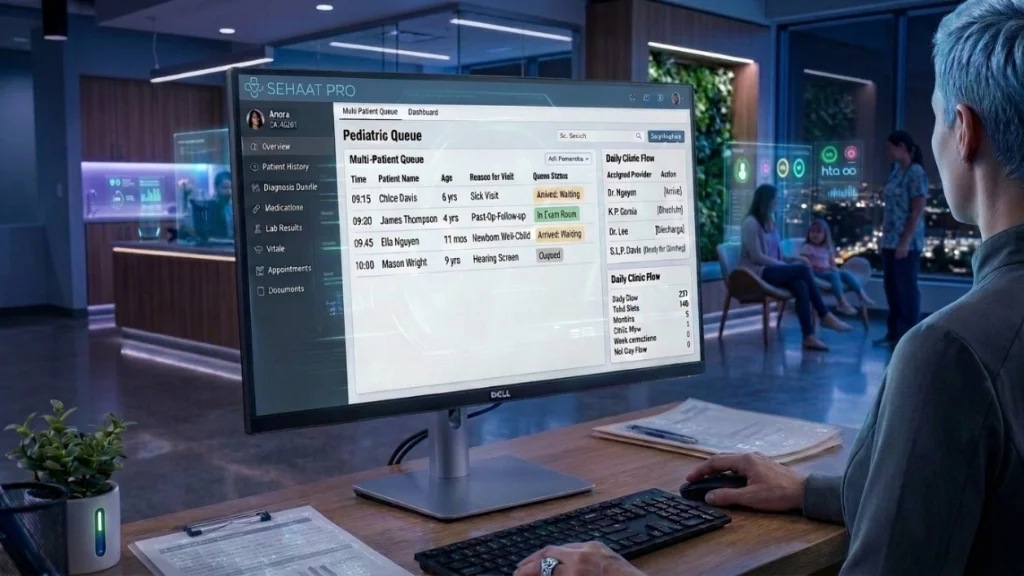
SehatPro’s appointment scheduling and queue management system handles this automatically — booked patients and walk-ins sit in the same queue logic, updated in real time on a screen or via SMS. A general physician in Multan running back-to-back consultations can see the next three patients queued without stepping out of the consultation room.
What to check before buying
- Does the system handle walk-ins as well as scheduled bookings?
- Can staff move a patient up the queue for urgent cases without breaking the whole schedule?
- Does it work when two receptionists are booking at the same time across counters?
A clinic in Lahore switching from a paper register to a live queue typically reports fewer front-desk arguments within the first week — not because patients wait less, but because they can see their position instead of guessing it.
2. Why Digital EMR and Patient History Matter More Than You Think
An EMR isn’t just a replacement for the paper file — it’s the only way a patient’s full history follows them, visit after visit, even if they see a different doctor at your clinic five years later.
Think about a diabetic patient in Karachi who visits your cardiology clinic twice a year. On paper, their file might be in a cabinet, misplaced, or half-illegible from an earlier doctor’s handwriting. With a digital EMR, every past prescription, lab result, and diagnosis note is searchable in seconds — no cabinet, no guessing.
This matters even more in multi-branch setups. A pediatric clinic chain with locations in Islamabad and Rawalpindi needs a child’s vaccination history accessible from either branch, not locked to whichever branch has the paper file that day. SehatPro’s unlimited patient records feature stores lifetime history per patient, tied to a single profile regardless of which branch or doctor they see.
Comparison: Paper Files vs. Digital EMR
| Factor | Paper-Based System | SehatPro Digital EMR |
|---|---|---|
| Time to pull patient history | 5–10 minutes (if found) | Under 10 seconds |
| Risk of lost or damaged records | High — fire, water damage, misfiling | Near zero — encrypted cloud backup |
| Prescription legibility | Handwriting-dependent | Print-ready, standardized |
| Multi-branch access | Not possible | Instant, centralized |
| Compliance readiness | Difficult to audit | Exportable, timestamped records |
A study cited by the Aga Khan University’s digital health research group found clinics using structured EMRs reduced repeat diagnostic testing by roughly 18%, largely because prior results were actually visible to the treating doctor.
3. How Does Fast Consultation and Prescription Writing Save Real Time?
Prescription writing should take under a minute per patient, not five — and it should be legible enough that the pharmacist doesn’t have to call your clinic to confirm a dosage.
Handwritten prescriptions are one of the most common sources of medication error in outpatient settings. A dermatologist in Sialkot seeing 40 patients a day, or a gastroenterologist in Karachi managing a full clinic, simply cannot afford five minutes per prescription. Templated, print-ready prescriptions cut that time in half — and eliminate the “can you read this back to me” call from the pharmacy.
SehatPro’s fast consultation and prescription writing tool lets a doctor select from reusable templates for common conditions, adjust dosage on the fly, and print or send the prescription directly — no rewriting the same instructions for the fortieth patient with seasonal flu.
Where this saves the most time
- General Physicians: repetitive conditions (flu, minor infections) get one-click templates
- Gynecologists in Lahore: standardized prenatal visit templates with adjustable fields
- Pediatricians in Islamabad: weight-based dosage calculations built into the template
One-click diagnosis bundles pair naturally with this — a single tap loads the standard tests, prescription, and follow-up note for conditions you see daily, instead of typing the same instructions from memory each time.
4. Why SMS and WhatsApp Reminders Reduce No-Shows
A missed follow-up isn’t just lost revenue — for a cardiology or diabetes patient, it can mean a missed opportunity to catch a worsening condition early.
No-show rates in outpatient clinics across Pakistan commonly run between 20–30%, according to healthcare operations data reported by Pakistan’s Health Services Academy. Most of that isn’t patient carelessness — it’s simply forgetting, especially among older patients or those managing multiple appointments across specialists.
Automated reminders close that gap without adding work for your staff. SehatPro’s automated SMS and WhatsApp reminders system sends appointment confirmations, day-before reminders, and medicine refill nudges automatically — in Urdu or English, depending on the patient’s preference. A urologist in Larkana with a heavy follow-up caseload doesn’t need a receptionist manually calling forty patients; the reminders go out on their own.
Pro Tip — SehatPro Insight: One of the most common mistakes we see across our 135+ partner clinics is setting reminders only for the appointment itself, not the medicine refill. Clinics that turn on both reminder types typically see a noticeably steadier return-patient rate, especially for chronic condition management like hypertension and diabetes.
5. What Does Multi-Branch Support Actually Solve?
Multi-branch clinics need one patient record, one reporting dashboard, and one login system — not four separate systems that don’t talk to each other.
A clinic group with branches in Faisalabad, Sahiwal, and Toba Tek Singh runs into a specific problem: a patient registered at the Faisalabad branch shows up at Sahiwal, and the receptionist has no visibility into their history. Without centralized records, that patient is treated as a first-time visit — repeating intake, losing prior context, and frustrating everyone involved.
SehatPro’s support for multi-branch clinics keeps every branch on a single centralized patient database, with branch-level reporting so an administrator in Lahore can see performance across all locations without visiting each one physically. This matters just as much for a two-branch eye specialist practice as it does for a ten-branch hospital network.
Centralized vs. Siloed Branch Data
- Siloed: Each branch keeps its own patient list — duplicate registrations, no shared history
- Centralized: One patient ID across all branches — history, prescriptions, and billing follow the patient
6. How Should Role-Based Access Protect Your Clinic?
Not every staff member should see every screen — your receptionist doesn’t need access to clinical notes, and your lab technician doesn’t need billing details.
Role-based access isn’t just a security feature; it’s how you prevent honest mistakes. A receptionist accidentally editing a diagnosis note, or a lab assistant seeing unrelated patient billing information, creates confusion and, in some cases, real compliance risk. SehatPro’s data privacy and security architecture assigns permissions by role — doctors, receptionists, and lab staff each see only what their job requires.
For clinics connected to a lab via QuickLab integration, this separation matters even more. Lab staff need to update test results without touching prescription history, and doctors need to view lab results the moment they’re ready — without either side having unrestricted access to the other’s workspace.
Encryption and secure cloud backups sit underneath all of this. Power cuts and unstable internet — a daily reality in many parts of Punjab and interior Sindh — shouldn’t mean lost data. Records sync back to the cloud the moment connectivity returns, and ProCare’s offline installation option keeps the clinic running even when the internet doesn’t cooperate.
7. Why Reporting and Insights Change How You Run Your Clinic
If you can’t see which days are busiest, which doctor has the highest patient load, or which month brought in the least revenue, you’re running your clinic on guesswork.
A dental clinic owner in Mirpur-AJK evaluating whether to hire a second dentist needs actual patient-volume data, not a gut feeling. SehatPro’s patient reports and insights dashboard generates daily and monthly summaries — patient counts, revenue, no-show rates — and exports directly to Excel for further analysis or accountant handoff.
This is also where compliance readiness lives. If a regulatory body or insurance partner asks for records, an exportable, timestamped report takes minutes to produce instead of days spent digging through paper registers.
Clinic Software Checklist — What Good Reporting Should Include
- Daily patient count by doctor and branch
- Revenue breakdown by service type
- No-show and cancellation rate tracking
- Exportable Excel/CSV reports
- Monthly comparison trends
8. Does the Software Actually Work in Urdu — and With Poor Internet?
A system your staff can’t operate in their working language is a system they’ll quietly stop using within a month.
Most front-desk and lab staff across Pakistani clinics work more comfortably in Urdu than English, and many clinics serve patients who read only Urdu or Sindhi. SehatPro’s multilingual interface supports Urdu, English, Arabic, Sindhi, and 27+ other languages, so a receptionist in Larkana or a lab assistant in Sahiwal isn’t fighting the software on top of the actual job.
Connectivity is the other real-world constraint software vendors from outside Pakistan tend to ignore. Cloud access from mobile, tablet, or PC covers most clinics, but for areas with genuinely unreliable internet — parts of interior Sindh, rural Punjab, AJK — the ProCare plan’s offline installation option keeps the clinic functional even during outages, syncing once connectivity returns.
Conclusion
A clinic doesn’t need more software — it needs the right features solving the specific problems slowing it down every day. The clinic management software features that matter most are the ones addressing your actual bottlenecks: a live queue instead of a shouting match at reception, a searchable EMR instead of a filing cabinet, print-ready prescriptions instead of illegible handwriting, and automated reminders instead of no-shows eating into your revenue.
Before choosing a system, walk through your own clinic’s worst Tuesday morning and check which of these ten features would have prevented it. Multi-branch clinics should prioritize centralized records; solo practitioners should prioritize speed of consultation; clinics in low-connectivity areas should prioritize offline capability.
FAQ
What is the most important clinic management software feature for a small clinic?
For a solo or small clinic, appointment scheduling with live queue management matters most. It directly reduces double bookings and front-desk chaos, which is usually the biggest daily pain point before EMR or reporting features come into play.
How much does clinic management software cost in Pakistan?
Pricing varies by scale. SehatPro’s plans start at PKR 2,999/month for the CareStart tier, scaling up to a one-time ProCare plan at PKR 79,999, with custom EnterpriseCare pricing for larger multi-branch operations.
Is clinic management software difficult for non-technical staff to learn?
Not if it’s designed for real clinic workflows. Look for a multilingual interface — SehatPro supports Urdu, English, Arabic, and Sindhi — since staff comfort with the working language matters more than the software’s feature count.
How secure is patient data in cloud-based clinic software?
Reputable systems use encryption and role-based access so only relevant staff see specific data, plus automated cloud backups so records survive power cuts or device loss — a common concern for clinics in areas with unstable electricity.
Can clinic management software work with poor or unstable internet?
Yes, if the vendor offers an offline option. SehatPro’s ProCare plan includes offline installation for areas with unreliable connectivity, syncing data to the cloud automatically once the connection is restored.
How long does it take to set up clinic management software?
Most cloud-based systems, including SehatPro, can be set up within a day for a single-branch clinic, with staff onboarding typically completed within the first week of regular use.